Your website,
in everyone's pocket.

PrimeWeb is Flutter source code that puts your website inside a native Android and iOS app, with push notifications, AdMob, onboarding and offline screens, plus a Laravel admin panel to change all of it without shipping an update.

Sales
1,452 sales
Latest version
v2.0.5 · Flutter 3.47
Author
by WRTeam, Elite Author
WRTeam Marketplace on a phone
9:41

example · marketplace.wrteam.in

1 / 6

Start with the site you already have.

Any URL that works in a phone browser. WordPress, Shopify, Laravel, hand-written HTML: PrimeWeb doesn't care what's behind it.

https://marketplace.wrteam.in
WRTeam Marketplace at desktop width
WRTeam Marketplace on a phone
9:41

Everything a browser tab can't do.

27 native features, each one a switch, not a sprint. Many are controlled from the admin panel after your app is already in people's hands.

Admin panel · Send Notification
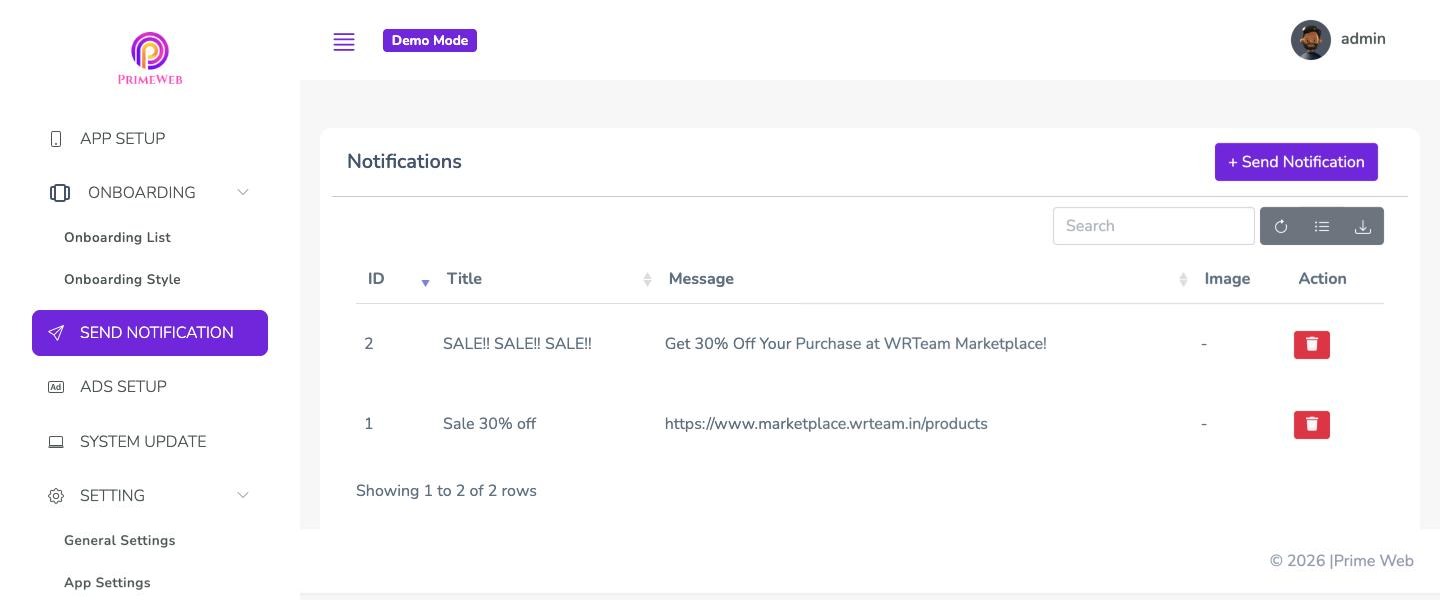
PrimeWeb admin panel, Send Notification page

01 / 07

Bring people back

Your website can't tap someone on the shoulder. Your app can.

  • Push notificationsFirebase Cloud Messaging, sent with a title, message and image from the panel
  • Rate usA Rate Us option in Settings that asks for the native store review
  • Share appA share message you set in the panel
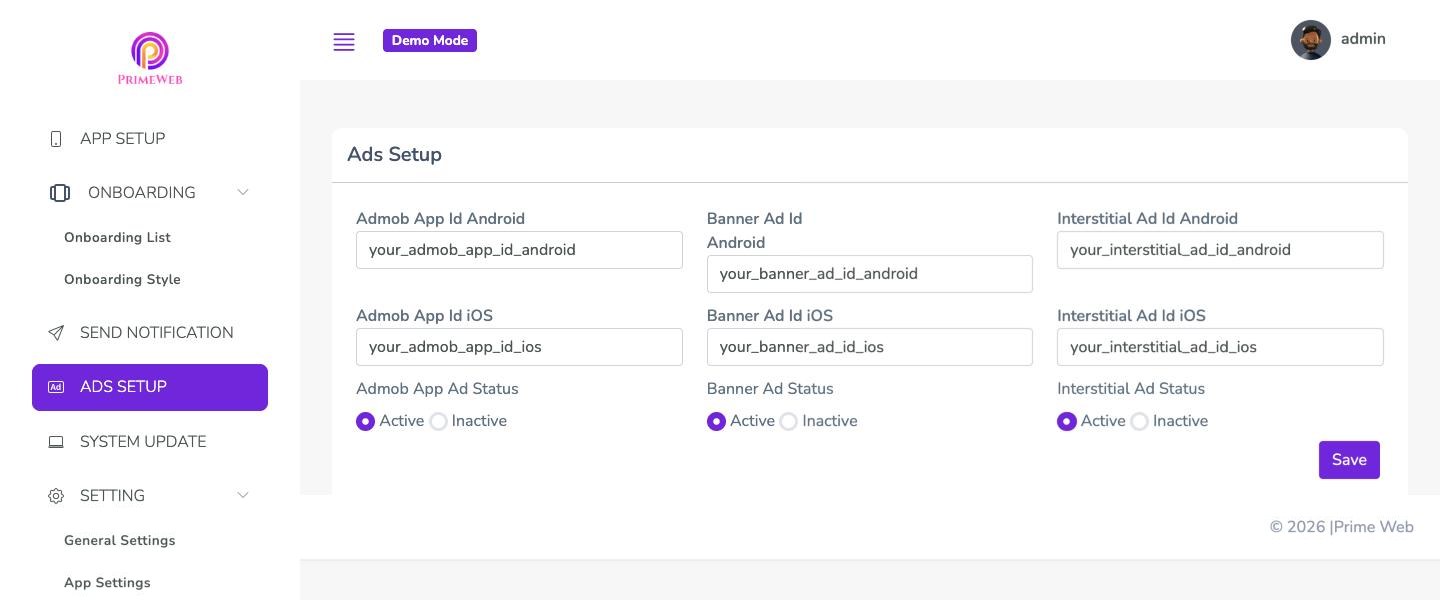
Admin panel · Ads Setup
PrimeWeb admin panel, Ads Setup page

02 / 07

Get paid for traffic

AdMob, configured and switched on from the panel. No rebuild needed.

  • Banner adsPinned under your website, never over it
  • Interstitial adsFull-screen ads between pages
  • Separate Android and iOS ad IDsEach with its own on/off switch
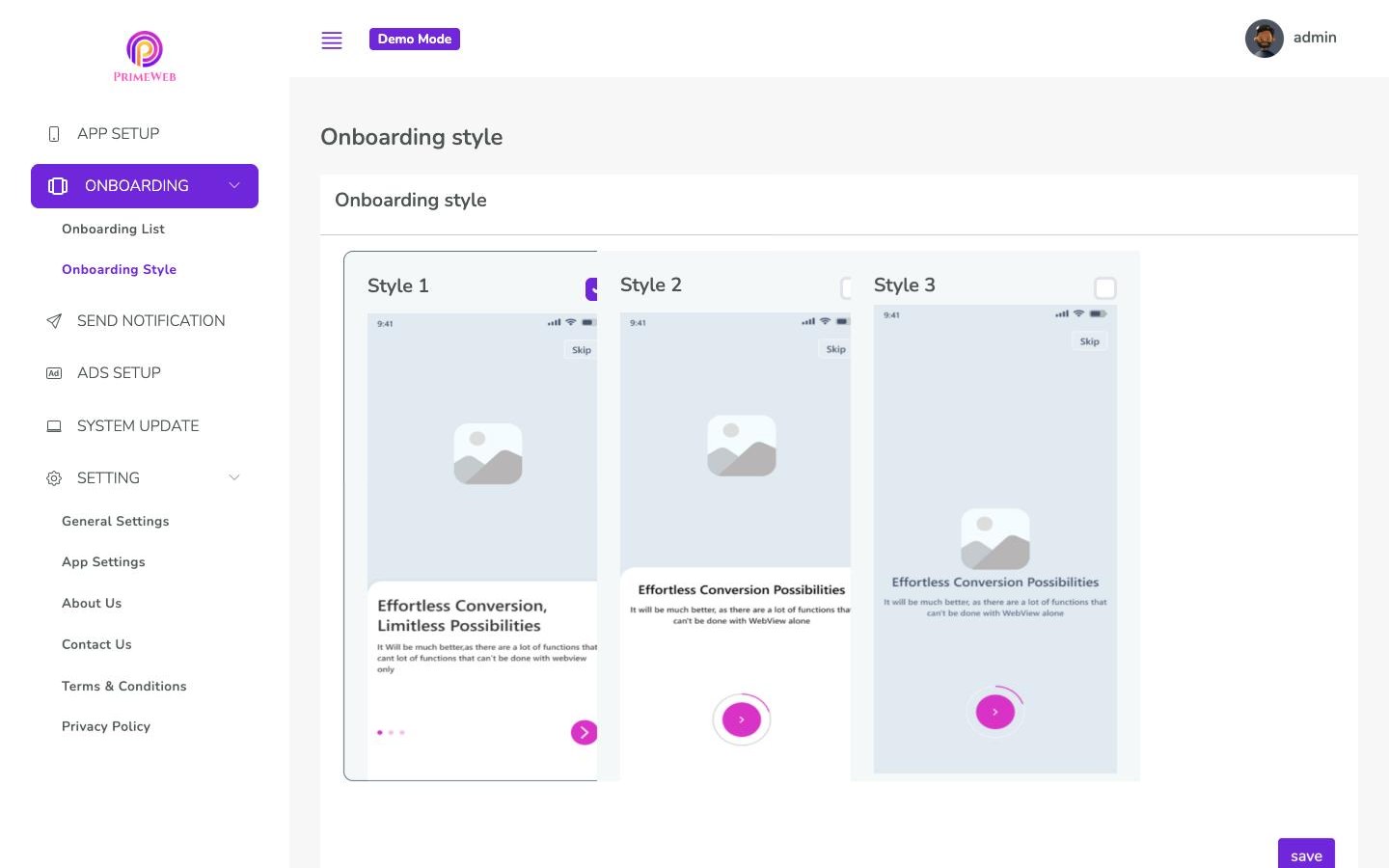
Admin panel · Onboarding Style
PrimeWeb admin panel, Onboarding Style page

03 / 07

Open like an app

First impressions that don't look like a loading browser.

  • Gradient splash screenYour logo on your colours
  • OnboardingThree layout styles; slides with title, text and image managed in the panel
  • Exit popupAsks before people leave the app
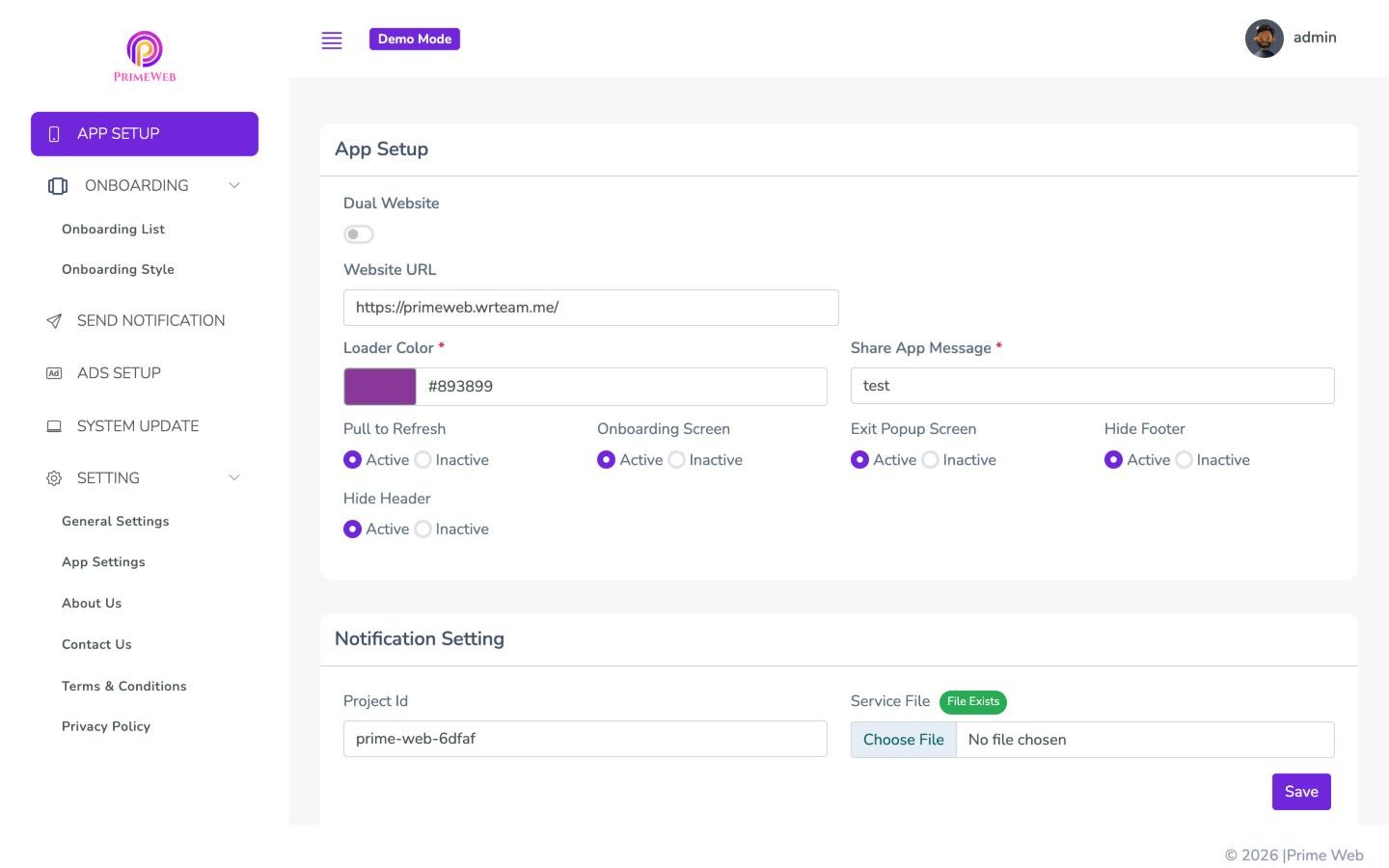
Admin panel · App Setup
PrimeWeb admin panel, App Setup page

04 / 07

Move like an app

Native navigation around your pages.

  • Dual websiteTwo sites in one app, with a bottom bar you label in the panel
  • Floating buttonsSettings and Back, when you run a single site
  • Pull to refreshThe gesture people expect
  • Hide header and footerDrop web chrome that duplicates the app
  • Loader colourThe page-load bar in your brand colour
No Internet Connection!
Under maintenance

05 / 07

Fail gracefully

A dropped connection never shows a browser error page.

  • No-internet screenResumes the same page when the signal returns
  • Maintenance modeOne switch puts every install on hold
  • Force updateSet the current Android and iOS versions and store links

06 / 07

Reach the phone

The bits a mobile browser keeps locked away.

  • Camera and microphoneGranted to your site through native prompts
  • LocationGeolocation for maps, delivery and check-ins
  • Downloads and uploadsFiles save to the device; file inputs open the native picker
  • Cookies on Android and iOSPeople stay signed in
  • Links that open the appYour domain's links can open straight into it
  • HTTP and imperfect SSLOlder sites still load

07 / 07

Make it yours

Your brand everywhere, the browser nowhere.

  • Light and dark modeAn in-app toggle in Settings
  • RTL websitesArabic, Hebrew and Urdu sites render right to left
  • Your content pagesAbout Us, Contact Us, Privacy Policy and Terms, edited in the panel
  • Your name, icon and packageBuilt and published under your own developer accounts

Swipe for more →

Plays everything your website plays.

Video, audio, GIFs, YouTube and Vimeo embeds, and file uploads all work inside the app, exactly as they do on your site. Pick one and play it in the phone.

Embedded players, with full-screen playback.

9:41

your-website.com/media

YouTube

PrimeWeb walkthrough · WRTeam

Change the app.
Skip the release.

The Laravel admin panel comes with the purchase. The app reads its settings every time it opens, so a change you save here reaches phones that are already installed.

your-domain.com/app_settings
PrimeWeb admin panel: App Setup

App Setup

Your website URL (or two, with Dual Website and their bottom-bar labels), loader colour, share message, and switches for pull to refresh, onboarding, the exit popup and hiding your site's header and footer.

Open the live admin demo

Demo login is filled in for you.

Real websites, running in the app.

Pick one of our own products and use it right here. It's the live site, full screen, with the app's floating buttons. The app you build opens straight to your website; this picker only exists in our demo.

This site blocks being shown inside other websites, so here it's a real capture taken on a phone. Drag to scroll, tap to open the live site.

WRTeam Marketplace on a phone
9:41

From URL to store listing in four moves.

  1. Step 1

    Buy and download

    Flutter app source and Laravel admin panel source, straight from CodeCanyon.

  2. Step 2

    Set up the panel

    Upload it to your server. Enter your website URL, logo, colours and which features are on.

  3. Step 3

    Build the app

    Point the app at your panel, add your Firebase files and package name, then run a Flutter build.

  4. Step 4

    Publish

    Upload to Google Play and the App Store from your own developer accounts.

What buyers say on CodeCanyon.

4.39

from 75 reviews · 1,452 sales

Excerpts from real buyer reviews. Read all 75 on CodeCanyon

Exceptional code structure and very easy to understand. The support team is also very active and helpful. Everything works exactly as described in the demo.
OkeMediaCode Quality
This App code, Support Design And Documentation everything is amazing in the first version my apps is approved in Playstore and Appstore…
VOHTechnologiesCode Quality
Love its floating navigation bar at the bottom and animated icons.
ppraj14Design Quality
The code is well-structured, clean, and easy to customize. The documentation provided is clear, making the setup process smooth and hassle-free.
mubeens4Flexibility
I get the support and make my app ready just after 10-15 minutes, this is amazing to me as I am new with flutter.
codemastertobeCustomer Support
They are really caring and helpful. They made the feature that is important to me free of charge. and the app provides a very useful and complete web view solution.
lim10softCustomer Support
CodeCanyon's best web app with excellent support.
joandradeCustomer Support
Best App for android and ios webview app, great support
akpkashyapCode Quality
Their responsiveness and knowledge were outstanding—they went above and beyond to resolve my issue quickly and thoroughly.
rohangauratCustomer Support
The script delivers as promised and works well. … The support is outstanding—quick, responsive, and super helpful.
prapinCustomer Support
Best app. The code is well done and the support is SUPER !
bekeCustomer Support
It's a very good script hope it will get usual updates to stay in the regulations and policies :) Very recommended
shaym23Feature Availability
Worked great, and customer service was immediate/superb
gimo0318Customer Support
Customer support is extremely good, i have no word for team, i love you guys you are doing great work.
UkulCoolCustomer Support
very good quality of code =) thanks you for your time and work !
dokuroCode Quality
I had problems and doubts because I couldn't find different things on documentation but I received immediately support.
svtmontagnaCustomer Support

Pay once. Own the code.

$29

one-time
Regular license

4.39 average from 75 buyer reviews · 1,452 sales

What you get

  • Flutter app source for Android and iOS
  • Laravel admin panel source
  • Step-by-step documentation
  • Future updates
  • 6 months of support from WRTeam

What you'll need

  • Flutter SDK to build the app
  • A server that runs Laravel (PHP) for the panel
  • A Firebase project for push and messaging
  • Google Play and Apple developer accounts to publish

Questions buyers ask.

Something else? Message the WRTeam pre-sales team on WhatsApp or Microsoft Teams.

Do I need to know Flutter?

You need Flutter installed to build the app, and you'll edit a couple of values (your admin panel URL, package name, Firebase files). The documentation walks through every step. After that, day-to-day changes happen in the admin panel, not in code.

Will it work with my website?

If your site works well in a phone's browser, it will work in PrimeWeb. Responsive sites feel best. WordPress, Shopify, Laravel, Next.js: the app doesn't care what the site is built with. Plain HTTP sites and sites with SSL issues are supported too.

When I update my website, do I need to update the app?

No. The app loads your live site, so content changes show up instantly. Settings like onboarding, ads, bottom-bar labels and maintenance mode change from the admin panel, also without a new release.

Can I publish to Google Play and the App Store?

Yes. You build the app under your own package name and publish it from your own developer accounts. The code is compatible with current Play policies (Android 16, 16 KB page size) and iOS 15+.

What's included in the purchase?

The full Flutter app source for Android and iOS, the Laravel admin panel source, documentation, future updates, and six months of support from WRTeam, with the option to extend support on CodeCanyon.

Regular or Extended license?

The Regular license covers one end product that users aren't charged for. If your end users pay for it, you need the Extended license. WRTeam has a short guide on the difference.

Can I try it before buying?

Yes. Install the Android demo from Google Play or the iOS beta through TestFlight, and log in to the live admin panel demo to see what you can control.

Give your website a home screen.

Flutter app, Laravel admin panel, documentation and updates. $29, once.

Questions before you buy? Talk to our pre-sales team.